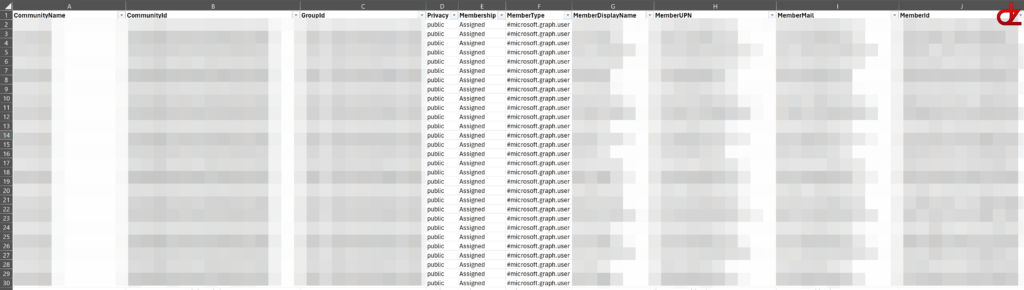


The code below will allow you to generate and export all the Viva Engage communities and members in 3 CSV files.
Code
# How to Export Viva Engage Community, Ownership, and Membership Details to CSV using Microsoft Graph API and PowerShell
# This script connects to Microsoft Graph using certificate-based authentication, retrieves Viva Engage community details plus their group owners and members, and exports the information to CSV files.
# Make sure to give your app registration the necessary permissions (Community.Read.All for application permissions) and grant admin consent before running the script.
# To export owners (M365 group owners), your app will also need permission to read group directory objects (commonly Group.Read.All or Directory.Read.All).

# Make sure you have the Microsoft.Graph PowerShell SDK installed. You can install it using:
Import-Module Microsoft.Graph.Authentication
Import-Module Microsoft.Graph.Groups

# Update these variables with your app registration details
$AppId      = "AppIdHere"
$ThumbPrint = "ThumbprintHere"
$TenantId   = "TenantIdHere"  # Prefer Tenant GUID if you have it

# Authenticate to Microsoft Graph using the app registration and certificate
try {
    Connect-MgGraph -ApplicationId $AppId -CertificateThumbprint $ThumbPrint -TenantId $TenantId -NoWelcome -ErrorAction Stop
}
catch {
    throw "Failed to authenticate to Microsoft Graph. Verify the certificate thumbprint is present (CurrentUser\\My or LocalMachine\\My), not expired, and the app registration has the correct cert configured. Details: $($_.Exception.Message)"
}

# Verify we have a Graph context
if (-not (Get-MgContext)) {
    throw "Connect-MgGraph did not establish a Graph context."
}

function Get-GraphPaged {
    param([Parameter(Mandatory)] [string] $Uri)

    $results = @()
    while ($Uri) {
        $resp = Invoke-MgGraphRequest -Method GET -Uri $Uri -ErrorAction Stop
        if ($resp.value) { $results += $resp.value }
        $Uri = $resp.'@odata.nextLink'
    }
    return $results
}

# 1) Viva Engage communities
try {
    $communities = Get-GraphPaged -Uri "https://graph.microsoft.com/v1.0/employeeExperience/communities?`$select=id,displayName,groupId,privacy"
}
catch {
    throw "Failed to list Viva Engage communities. Confirm the app has Community.Read.All (application) granted with admin consent and your Engage network is in native mode. Details: $($_.Exception.Message)"
}

$communitySummaryRows = @()
$communityMemberRows  = @()
$communityOwnerRows   = @()

# For each community, get the membership type and members. Note that the membership is managed by the connected M365 group, so we check the group type to determine if it's dynamic or assigned membership. We also handle any errors that may occur when retrieving group details.
foreach ($c in $communities) {

    # 1) Determine the membership type (Dynamic or Assigned) based on the connected M365 group. If we fail to retrieve the group details, we set the membership type to 'Unknown' and continue processing the members if possible.
    $membershipType = 'Unknown'
    try {
        $group = Invoke-MgGraphRequest -Method GET -Uri "https://graph.microsoft.com/v1.0/groups/$($c.groupId)?`$select=id,groupTypes,membershipRule,membershipRuleProcessingState" -ErrorAction Stop
        if ($group.groupTypes -and ($group.groupTypes -contains 'DynamicMembership')) {
            $membershipType = 'Dynamic'
        }
        else {
            $membershipType = 'Assigned'
        }
    }
    catch {
        $membershipType = 'Unknown'
    }

    # 2) Owners for each community (ownership is managed by the connected M365 group)
    $owners = @()
    if ($c.groupId) {
        try {
            $owners = Get-GraphPaged -Uri "https://graph.microsoft.com/v1.0/groups/$($c.groupId)/owners?`$select=id,displayName,userPrincipalName,mail"
        }
        catch {
            $owners = @()
        }
    }

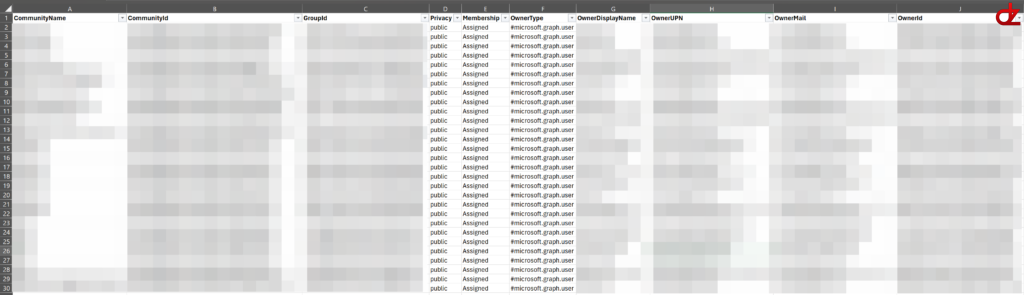
    foreach ($o in $owners) {
        $communityOwnerRows += [pscustomobject]@{
            CommunityName     = $c.displayName
            CommunityId       = $c.id
            GroupId           = $c.groupId
            Privacy           = $c.privacy
            Membership        = $membershipType
            OwnerType         = $o.'@odata.type'
            OwnerDisplayName  = $o.displayName
            OwnerUPN          = $o.userPrincipalName
            OwnerMail         = $o.mail
            OwnerId           = $o.id
        }
    }

    # 3) Members for each community (membership is managed by the connected M365 group)
    $members = @()
    if ($c.groupId) {
        $members = Get-GraphPaged -Uri "https://graph.microsoft.com/v1.0/groups/$($c.groupId)/members?`$select=id,displayName,userPrincipalName,mail"
    }

    # Add a summary row for the community, including the membership type and member count. We use @() to ensure that if $members is $null, we still get a count of 0.
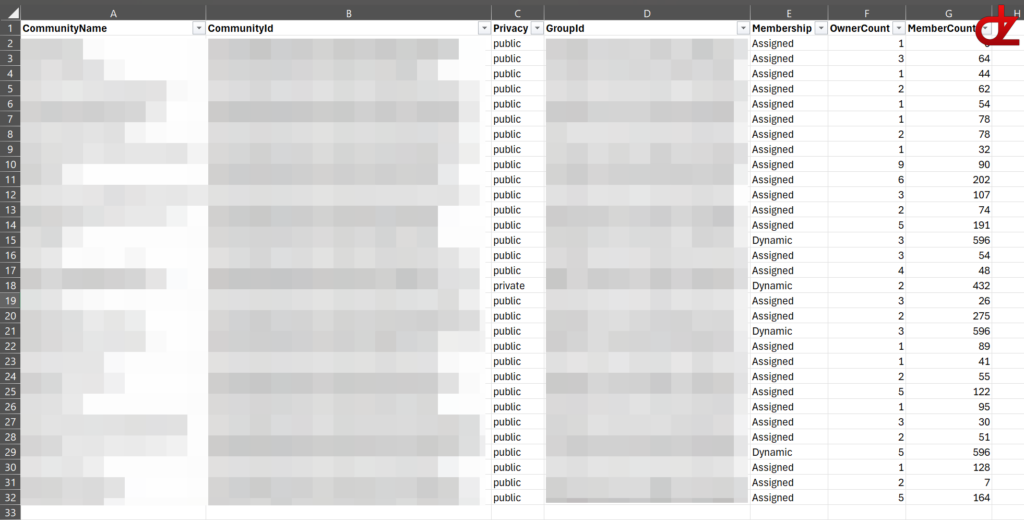
    $communitySummaryRows += [pscustomobject]@{
        CommunityName = $c.displayName
        CommunityId   = $c.id
        Privacy       = $c.privacy
        GroupId       = $c.groupId
        Membership    = $membershipType
        OwnerCount    = @($owners).Count
        MemberCount   = @($members).Count
    }

    # Add a row for each member of the community, including the community details and member details. We also include the member type (user, service principal, etc.) based on the '@odata.type' property.
    foreach ($m in $members) {
        $communityMemberRows += [pscustomobject]@{
            CommunityName     = $c.displayName
            CommunityId       = $c.id
            GroupId           = $c.groupId
            Privacy           = $c.privacy
            Membership        = $membershipType
            MemberType        = $m.'@odata.type'
            MemberDisplayName = $m.displayName
            MemberUPN         = $m.userPrincipalName
            MemberMail        = $m.mail
            MemberId          = $m.id
        }
    }
}

# If no communities were returned, warn the user and skip the CSV export. This could happen if there are no Viva Engage communities in the tenant or if the app registration does not have the correct permissions.
if (@($communitySummaryRows).Count -eq 0) {
    Write-Warning "No communities were returned. No CSV files were written."
    return
}

# Console preview
$communitySummaryRows | Sort-Object CommunityName | Format-Table -AutoSize

# CSV exports
$communitySummaryRows | Sort-Object CommunityName | Export-Csv -NoTypeInformation -Encoding utf8 "C:\Temp\VivaEngageCommunities.csv"
$communityOwnerRows   | Sort-Object CommunityName, OwnerDisplayName  | Export-Csv -NoTypeInformation -Encoding utf8 "C:\Temp\VivaEngageCommunityOwners.csv"
$communityMemberRows  | Sort-Object CommunityName, MemberDisplayName | Export-Csv -NoTypeInformation -Encoding utf8 "C:\Temp\VivaEngageCommunityMembers.csv"

Write-Host "\nWrote: VivaEngageCommunities.csv" -ForegroundColor Green
Write-Host "Wrote: VivaEngageCommunityOwners.csv" -ForegroundColor Green
Write-Host "Wrote: VivaEngageCommunityMembers.csv" -ForegroundColor Green
Example outputs
VivaEngageCommunities
VivaEngageCommunityOwners
VivaEngageCommunityMembers